

The need to store files is present a large part of the applications we develop. But now, when you have a fully integrated SQL application, is it necessary to provision a SharePoint site collection to manage its documents? By inevitably (and luckily 😛 )
However, there are advantages to using SharePoint to manage files:
- Security management on files (if we respect the SharePoint recommendations)
- Possibility of co-editing on documents (with SharePoint 2013 and above)
- Document management via document sets
- Native GED feature not available when storing its files in SQL (versions, comments, sharing)
If these needs are not needed, K2 SmartObjects can read and save files to an SQL table.
To put this feature in place, at first, it is necessary to provide for the storage of the file in database. To do this, create a column of type nvarchar(max).
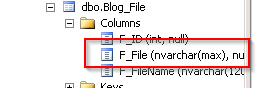
Then, generate a SmartObject associated with this table, K2 will by default create a property of type memo associated with our column, it will be necessary to go change the type of column in file.

Nothing more simple, you just have to create item or list views to manipulate files in your forms.

It’s your turn 😉